Why teams move from Webflow to Astro
As sites grow, some teams reach Webflow’s edges: CMS item and field limits, custom code living in embeds, localisation needs or features that require a backend. Astro removes those ceilings by giving you the code itself.
Workarounds pile up in custom code embeds, plan upgrades are driven by limits rather than needs, and developers can’t use their usual tools, tests or version control.
I’ll rebuild your design as Astro components, move your CMS content into a headless CMS or content collections, and keep your URLs and SEO intact.
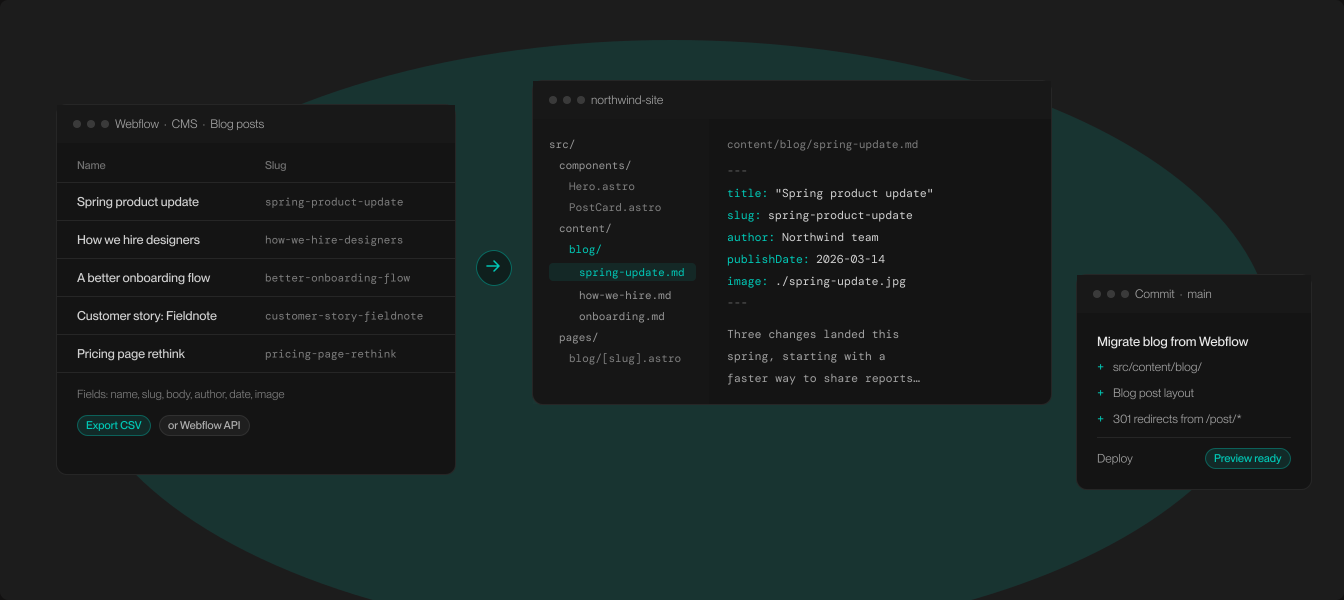
What comes across from Webflow
Your design, CMS content and search visibility rebuilt in Astro, in a codebase you own.
Your design, as components
Webflow layouts and classes rebuilt as Astro components, keeping the look your visitors already know.
CMS content, exported and moved
Webflow CMS collections exported into a headless CMS or Astro content collections, with references kept.
Custom code, properly built
Scripts and embeds rebuilt as real components and integrations, tested and version-controlled.
SEO and redirects
URLs, metadata and Open Graph settings carried over, with 301 redirects for anything that changes.
How it works
Audit your Webflow site
I’ll export your CMS, review your pages, interactions and custom code, and agree the CMS and hosting for the Astro build.
Rebuild in Astro
I’ll build the components and templates, move your content and recreate interactions with lightweight JavaScript.
Redirect, launch and hand over
I’ll set up redirects and deploys, launch on your domain and hand over the code and documentation.
Is this the right fit?
This is for teams whose Webflow site has outgrown the platform and who have, or plan to have, developers to own the code.
- Remove CMS and plan limits.
- Build custom features without embeds.
- Use Git, code review and testing.
- Keep your design, rankings and URLs.
- Choose your own hosting and CMS.
If the main goal is letting marketers build pages visually, staying on Webflow is often the better call, and I can help you get more out of it instead.
FAQs
How do you migrate a Webflow site to Astro?
A Webflow to Astro migration starts with exporting your CMS collections and reviewing every page, interaction and custom script. I then rebuild the design as Astro components, move content into a headless CMS or Astro content collections, recreate interactions with lightweight JavaScript and set up 301 redirects before launch.
Why move from Webflow to Astro?
Teams usually move when they hit platform limits: CMS item or field caps, complex localisation, features that need a backend, or custom code that has outgrown embeds. Astro gives you the code itself, so there are no platform ceilings and developers can use version control, testing and their usual tools.
Can you export Webflow CMS content to Astro?
Yes. Webflow CMS collections can be exported as CSV or pulled through the Webflow API, then imported into a headless CMS or converted into Astro content collections. Rich text, images, references and SEO fields are mapped and checked after import.
Can Webflow interactions be rebuilt in Astro?
Yes. Scroll, hover and page-load animations are rebuilt with CSS or lightweight libraries such as GSAP, loaded only on the pages that use them. I review every interaction during the audit and agree how each one will work.
Will moving from Webflow to Astro affect SEO?
Handled properly, it shouldn’t. I keep URLs the same where possible, carry over titles, descriptions and Open Graph images, add 301 redirects for anything that changes and submit a new sitemap after launch. Astro’s static HTML output is fast and easy for search engines to crawl.
Can my team still edit content after moving to Astro?
Yes. Content moves into a headless CMS such as Sanity, Storyblok or Keystatic, where your team edits text, images and blog posts. What changes is layout editing: new page designs and components are built in code rather than in a visual designer.
Is Astro cheaper to run than Webflow?
Often, yes. Static Astro sites can be hosted on Netlify, Vercel or Cloudflare at low cost, with no CMS item or seat-based plan tiers for the site itself. Factor in developer time for layout changes, which Webflow’s visual editor would otherwise cover.
How long does a Webflow to Astro migration take?
It depends on the number of pages and templates, how much CMS content is moving and how much custom code needs rebuilding. A small marketing site moves faster than one with a large CMS and complex interactions. You’ll get a timeline once I’ve audited your Webflow site.
“We launched a new specialist, boutique tax advisory business in March 2025 and Matt created our website. Matt’s service and end product was exceptional, meeting with our design and timing requirements and being highly responsive during the process. Would highly recommend.”
James PilbeamLumentis Partners


